
Mounting tablets in public spaces: angle, security and cable routing
A tablet kiosk lives or dies on three details: the viewing angle, how it is locked down and where the cable goes.

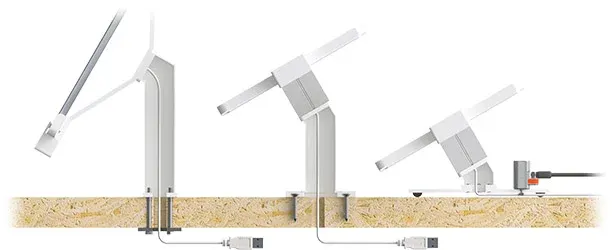
We have been designing tablet displays since our first digital-branch project in 2012. The hardware has changed many times since then; the three questions we ask on every project have not.
Get the angle right
As a rule of thumb, the screen should cross the user’s line of sight at roughly 90°. A tablet on a counter that customers lean over needs a flatter angle than one on a desk where someone sits. On a wall, it depends on whether people approach it standing or seated.
That is why the IVY Desk and Wall Displays come in four versions — 0° flat, 30° short, 30° long and 60° long — rather than one fixed angle.
Lock it down
- Use an enclosure with a lock and key, so the tablet cannot be lifted out.
- On free-standing displays, add a Kensington ClickSafe® or steel cable.
- Hide wall fixings behind a cover so the whole unit cannot be unscrewed.
- For floor stands at events, use anti-theft bolts so only authorised staff can take the foot off.
Plan the cable before the fixing
Cable routing is usually what makes an installation look professional — or not. On a desk, a blind fixing through the counter hides the cable completely. On a wall, the cable can be routed on the surface or through the wall depending on the site.
Decide this before drilling: once the display is fixed, it is much harder to change.
Need a hand?
Tell us where the tablet will be used and by whom, and we will recommend the version, fixing and cable route.